Providers
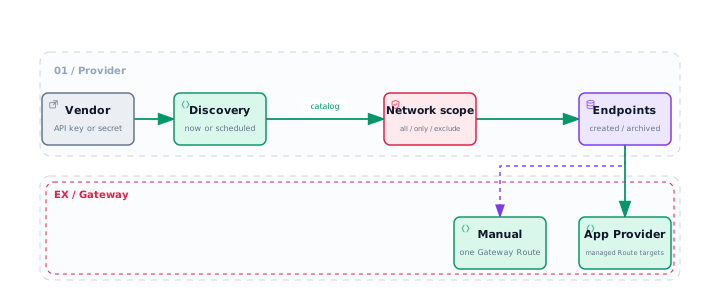
A Provider connects RPC Gateway to an RPC vendor account. It uses the vendor API key or secret to discover available networks and synchronizes the results into Endpoints owned by the current account.
A Provider maintains Endpoint inventory. Synchronization alone does not change arbitrary Gateway Routes: you can attach synchronized Endpoints manually, or associate one Provider with an App and let the Gateway maintain matching Route targets for that App.
What a Provider manages
A Provider manages Endpoint inventory, while Gateway Routes decide which matching Endpoints can receive traffic.
| Object | Responsibility |
|---|---|
| Provider connection | Stores vendor credentials, discovery scope, and synchronization settings. |
| Synchronized Endpoint | Holds the vendor-managed upstream connection. |
| Gateway Route | Determines whether the Endpoint can receive traffic. |
| App Provider association | Maintains matching synchronized targets for that App. |
| Manual Route target | Remains under manual control. |
Use RPC Provider Integrations to compare the supported discovery models, or see Multi-Provider RPC for the routing overview.
Supported vendors
| Vendor | Networks | Coverage | Protocols for TRON |
|---|---|---|---|
| Alchemy | 20 | Every network in the Gateway catalog, generated from the catalog | JSON-RPC and HTTP API |
| QuickNode | 20 | Every network in the Gateway catalog, limited to the Endpoints in your account | JSON-RPC and HTTP API |
| Chainstack | 19 | EVM, Solana, Bitcoin, TRON, and Litecoin Mainnet, limited to the nodes in your account | JSON-RPC and HTTP API |
| dRPC | 16 | EVM, Solana Mainnet Beta and Devnet, Bitcoin Mainnet, TRON Mainnet | JSON-RPC only |
| Tenderly | 10 | Ethereum, Polygon, Arbitrum, Optimism, and Base | — |
The Networks column counts the chain-network combinations the integration can produce, out of the 20 in Supported networks.
Each integration synchronizes the intersection of the networks supported by the vendor and Supported networks. Open a vendor page for its exact network table, credential requirements, and synchronization behavior.
The vendor credential is used to access the vendor account or to configure the authentication required by synchronized Endpoints. Use a valid credential from the vendor dashboard and keep it in secret storage with redaction enabled for logs and public links.
Create and sync a Provider
Create the connection
Open Endpoints, switch to Providers, select Connect provider, and configure:
- Name: identifies this connection in the dashboard;
- Vendor: Alchemy, QuickNode, Chainstack, dRPC, or Tenderly; it cannot be changed after creation;
- API key / secret: the credential issued by the vendor;
- Automatic sync: whether to refresh Endpoint inventory once per day;
- Networks: optionally limits synchronization to selected networks supported by the vendor.
The dashboard connection flow enables daily sync by default; you can turn it off before saving. The Management API defaults sync_enabled to false when the field is omitted. When daily sync is enabled, the platform assigns the account one of 96 UTC windows and synchronizes its Providers sequentially once per day. A missed window is not caught up; synchronization resumes in the next daily window. You can select Sync now whenever an immediate refresh is needed.
An account can have up to 6 undeleted Providers. Disabled Providers count toward this limit; deleting one frees the capacity.
Choose networks
Leave the selection empty to synchronize every network discovered by the vendor and supported by that Provider integration. Select one or more chain and network pairs to synchronize only those networks.
The selection narrows vendor discovery to networks already supported by the integration. Run synchronization again after changing it to apply the new scope.
Review the result
Synchronization can apply these Endpoint lifecycle changes internally:
| Result | Meaning |
|---|---|
| Created | A newly discovered Endpoint was created |
| Updated | Vendor-managed connection details such as URL or authentication changed |
| Restored | A previously archived Endpoint reappeared and became available again |
| Archived | A complete discovery confirmed that the Endpoint left the vendor inventory |
| Skipped | An Endpoint could not be identified, validated, or safely updated |
The Provider row shows the last synchronization status:
- Never synced: synchronization has not run yet;
- Success: discovery and updates completed;
- Partial: usable results were published, but some Endpoints or vendor catalog data could not be processed completely;
- Failed: discovery failed and no destructive inventory changes were published.
Open the Provider row’s Activity tab to inspect persistent synchronization runs. A run records whether it was manual or scheduled, its queued and started times, its current queued, running, success, partial, or failed state, the aggregate number of Endpoint changes, and a failure message when applicable. The public run record does not expose a per-Endpoint action list; inspect the Provider’s Endpoints tab for the resulting inventory state.
An incomplete discovery does not bulk-archive Endpoints omitted from its response. When vendor metadata is missing for one Endpoint, its existing record is also preserved so a temporary vendor failure does not cause a destructive update. Vendors differ in what happens when their catalog is unreachable; see the vendor page for its exact behavior.
Add Endpoints to a Gateway Route
Open the Provider tab under Endpoints and review the synchronized records. The Provider manages connection details such as chain, network, URL, and authentication, so these fields cannot be edited like a manually created Endpoint.
For manual control, open the target App, select the Gateway for the same chain and network, and add the Endpoint to its default JSON-RPC Route. An Endpoint participates in routing, load balancing, and failover only after a Route references it.
Alternatively, select the Provider in the App creation flow. The App association publishes matching synchronized Endpoints to that App’s JSON-RPC and HTTP API Routes and keeps those automatically managed targets aligned with later Provider synchronizations. It does not change Routes belonging to another App. Clearing or replacing the App Provider removes the old Provider’s automatically managed targets; manually selected Route targets remain under manual control.
Disable, update, or delete a Provider
- Disable a Provider: stops manual and automatic synchronization while retaining synchronized Endpoints. Re-enable it to resume synchronization.
- Replace the credential: saving a new value immediately replaces the previous credential. The next synchronization updates Provider-managed Endpoint authentication from discovery results.
- Delete a Provider: clears connected App associations and automatically managed Route targets, stops management, and detaches its Endpoints. By default, each Endpoint retains its URL, authentication, and configuration.
- Also delete unreferenced Endpoints: deletes only Endpoints unused by Gateway Routes. Referenced Endpoints are always retained and detached from the Provider.
When a complete synchronization finds that an Endpoint has disappeared, the system tries to archive it. An Endpoint referenced by a Route is not archived and is reported as skipped instead.
Synchronization checklist
Validate the connection
Keep the Provider enabled, use a valid credential with the permissions listed on its vendor page, and confirm that the vendor management API is reachable. Open Activity to review the latest run status and message.
Validate discovery scope
Include the target in the Provider’s network selection, confirm it appears in Networks and hosts, and use a credential that grants the access required by the vendor page.
Publish Endpoints to a Gateway
For an associated App Provider, keep a matching App Gateway enabled and review its automatically managed target. For manual control, open the target App and add an enabled synchronized Endpoint with a matching chain and network to the Gateway Route.
Review Endpoint lifecycle
Use the Provider’s Endpoints tab and the run summary to review created, updated, restored, archived, and skipped records. Keep Route-referenced inventory attached when continued traffic is required.